For Fire TV & Android TV

Everything you watch.
One home screen.

Your stick came with someone else's shop front. Ryvo replaces it with a proper media hub — a full seven-day TV guide, your on-demand library sorted the moment it lands, and playback that doesn't buckle. You bring the playlist. Ryvo makes sense of it.

From £3.99/month · £49.99 once, forever · No advertising, ever

Ryvo 7:38
Featured Tonight's pick 4KHDRFilm · 1h 58m PlayMore info
Recently added
TV GuideOn DemandApps SettingsRyvo One Ryvo SelectRyvo Signature

Ryvo is a player, not a provider. It ships with no channels, no films and no subscription to anybody else's service. It plays the M3U or Xtream playlist you already pay for — and organises it far better than the app you're using now.

The interface

Built for a sofa, a remote and a big screen

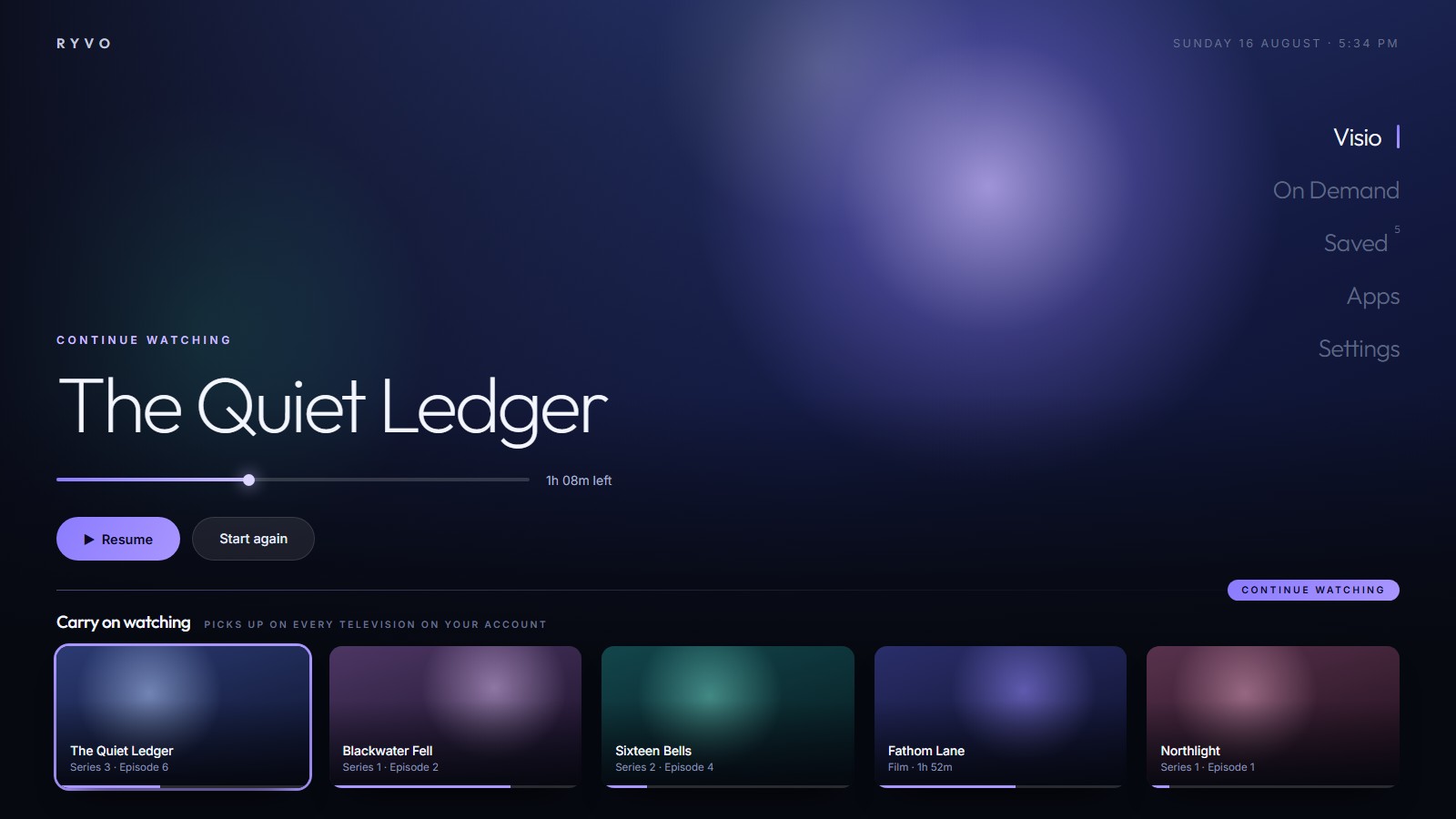
Every screen is designed at ten feet: large type, one clear focus ring, nothing buried more than two clicks deep. Pick a screen to look around.

Ryvo7:38
Featured Tonight's pick 4KHDRFilm · 1h 58m PlayMore info
Continue watching
TV GuideOn DemandApps SettingsRyvo One Ryvo SelectRyvo Signature

Home — a cinematic hero, your own rails, and the rooms docked along the bottom.

What you get

The bits your current app gets wrong

Ryvo was built by someone who got fed up with lists of ten thousand channels in no particular order. All of this is in the box.

A guide that feels like telly

Seven days of EPG in a proper grid, with now & next, a live time bar, and category filters. Star the channels you actually watch and the rest gets out of the way.

Catch-up & time-shift

Rewind live television, or jump back through the last few days on channels whose provider supports it. Missing the start of something stops being a problem.

Rooms, sorted for you

Your on-demand library is split into Ryvo One, Ryvo Select and Ryvo Signature the moment it imports. Films apart from series, seasons grouped, duplicates merged, nothing to tidy by hand.

Playback that holds up

Adaptive HLS with real quality switching, fast and exact seeking, subtitle and audio-track selection, and repair for awkwardly-encoded streams that stall other players outright.

Search that finds it

One search box across live channels, films and series at once. Type three letters on the remote and it's already there.

Remote-first, always

Real spatial navigation, a focus ring you can see from the sofa, and rows that stay locked so the cursor never wanders off somewhere odd. No mouse, no phone, no faffing.

Setup

Three steps, about four minutes

No computer needed after the install. Everything else happens on the telly.

  1. 01

    Install Ryvo on your stick

    Ryvo runs on Fire TV sticks and boxes, and on Android TV / Google TV devices. You'll get the file and a plain-English install guide the moment you buy.

  2. 02

    Add the playlist you already have

    Open Settings and enter your M3U URL, or your Xtream host, username and password. It stays on your device — Ryvo has no account and nothing to sign into.

  3. 03

    Let it sort itself out

    Ryvo reads the lot, builds the guide, splits films from series and fills your rooms. Then it gets out of the way and you just watch things.

Pricing

One price. Every feature.

There's no cut-down tier and nothing held back for an upgrade — every plan is the whole of Ryvo. The only choice is how long you'd like to pay for.

Monthly

£3.99/month

Cancel whenever you like.

  • Everything in Ryvo
  • Full 7-day TV guide
  • Rooms & auto-sorting
  • Updates included
Choose monthly
Best value

Yearly

£14.99/year

Just over £1.25 a month — around 69% off.

  • Everything in Ryvo
  • Full 7-day TV guide
  • Rooms & auto-sorting
  • Updates included
Choose yearly
Pay once

Lifetime

£49.99once

Buy it, own it. No renewal, ever.

  • Everything in Ryvo
  • Full 7-day TV guide
  • Rooms & auto-sorting
  • All future updates
Choose lifetime

Prices in GBP and include VAT where it applies. Ryvo does not supply or resell television content of any kind.

Ryvo is nearly ready

Leave an email and you'll get the download, the install guide and launch pricing the day it opens. One message — no list, no newsletter, no sharing it with anyone.

Questions

Straight answers

Does Ryvo come with channels or films?

No — and it never will. Ryvo is a player. It has no content of its own, no bundled playlist and no connection to any television service. You point it at a source you already have, exactly like a web browser needs a website.

What do I need to use it?

A Fire TV or Android TV device, a decent internet connection, and an M3U or Xtream playlist from whichever provider you already use. If your provider gives you a URL or a host, username and password, Ryvo can read it.

Which devices does it run on?

Fire TV Sticks and Fire TV boxes, plus Android TV and Google TV devices. It's built for a remote and a landscape screen, so it's a telly app first and foremost.

Do I need to make an account?

No. There's no Ryvo login and no profile to create. Your playlist details are saved on the device itself, not on a server of ours.

What's actually the difference between the plans?

Nothing but the billing. Monthly, yearly and lifetime all unlock the whole app. Yearly works out around £1.25 a month; lifetime is a single payment with no renewal.

Will it keep getting better?

Yes, and updates are included on every plan — lifetime included. Ryvo is actively built, not shipped and abandoned.